Import one PDF and send a test in minutes. On any paid plan we move your 10 most-used templates for you, while PandaDoc keeps running.
How it works
01
Step 1
Export one proposal from PandaDoc as a PDF
Download a proposal, SOW, NDA or retainer you already send, before it is signed.
02
Step 2
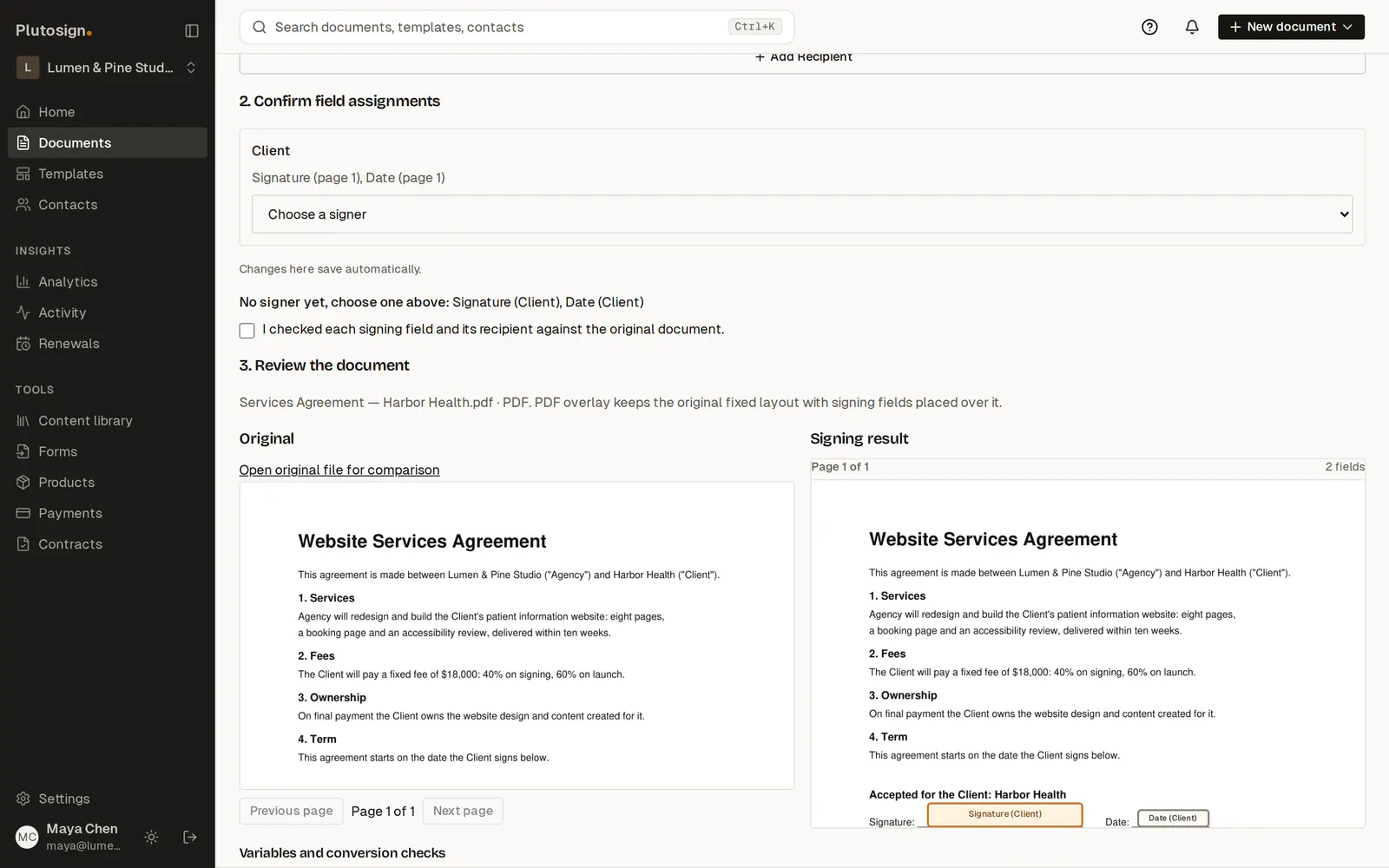
Import it: fields placed, signer roles suggested
Instant Switch places signing fields on the signature and date lines and suggests signer roles from the parties the document names, such as Client and Agency. Tables and amounts come across. Review them and choose your recipients.
03
Step 3
Send a test to yourself
Send it to your own email and sign it the way your client will, on a phone or a computer. Keep PandaDoc running while you test.
Prefer we handle your reusable templates? Every paid plan includes done-for-you migration of your 10 most-used templates. Keep your templates in Word or Google Docs? Import Word files (or Google Docs downloaded as .docx) as editable templates — text, tables, pricing and merge fields come across for you to review.
Your 10 most-used templates migrated for you on any paid plan · self-serve import on Free
Switching from PandaDoc, DocuSign, Dropbox Sign, Proposify, Qwilr or Better Proposals? 25% off your first year on an annual Growth, Agency or Scale plan, until March 31, 2027. Full details on pricing
Price locked while you stay subscribed. No features removed. Unused annual months refunded. A person replies within 1 business day. Read our fair terms
Switching from PandaDoc, DocuSign, Dropbox Sign, Proposify, Qwilr or Better Proposals? On any paid plan we migrate your 10 most-used templates for you: fields, roles, variables and pricing. Run both tools side by side and test a send before moving the team.
02
Running into DocuSign envelope caps?
DocuSign Standard and Business Pro annual plans list 100 envelopes per user/year (DocuSign pricing page, checked November 6, 2026). Plutosign paid plans include unlimited sends from the app, plus proposal editing and pricing tables.
03
PandaDoc bill growing with every seat?
5 seats: $2,940 a year on Growth, the same as PandaDoc Business. 10 seats: $4,284 a year on Agency, 27% less than PandaDoc Business. 20 seats: $7,188 a year on Scale, 39% less. Extra seats are $29 a month.
Import Word files (or Google Docs downloaded as .docx) as editable templates — text, tables, pricing and merge fields come across for you to review. Upload a .docx, or download a Google Doc as .docx first.
Merge fields such as [Client.Company], {{client_name}} and «ClientName» become reusable variables.
Quote tables become pricing tables — optional items and monthly fees included — when every line and the subtotal add up. Other tables stay as tables.
Headings, lists, numbered clauses (1.1, 1.1.1), links, images and page breaks keep their structure.
Signature lines become signer fields on the documents you send.
You approve each conversion before it is applied, and clause wording is kept exactly as written. Fonts and page layout follow your Plutosign theme.
Will Plutosign replace your workflow?
Bring your proposals, SOWs and retainers into one place for drafting, review and signing. Start with your most-used template, connect your tools and move the team at your own pace.
Create and sign
Proposals, SOWs, retainers, pricing tables, reusable templates and e-signatures
Signing order, reminders and expiry
Internal approval before sending
Template automations: notifications and follow-up templates on Growth and above; CRM deal stages on Agency and Scale
Multi-document workflow sequences
Client payment after signing through your own Stripe account (Growth and above)
Connect your tools
Import contacts and create drafts from deals with HubSpot or Pipedrive
Use the API and webhooks to connect your own tools
Bring your contact list in by CSV
Keep your records together
Finish existing agreements in your current tool
Archive the original signed PDFs and audit trails
Use rebuilt templates for new agreements in Plutosign
How do I keep access to existing signed contracts?
Export the signed PDFs and their original audit trails from PandaDoc or DocuSign before canceling, and keep those originals accessible to your team. Template rebuilds give you a starting point for new agreements; your archived files preserve the record of earlier ones.
How long does the switch take?
AI places the fields and signer roles on your PDF, so a test send takes minutes. Start with a 30-minute switch call and your 10 most-used templates. On any paid plan, we migrate them and test a send together while your current tool stays running. Ask for the migration from Billing; a person replies within one business day. Timing depends on the templates; Agency and Scale scope larger libraries at onboarding. Contacts import via CSV.
What about my existing reminder schedules and workflows?
Bring your reminder, signing-order and expiry settings so we can recreate them with your templates. Internal approval before sending is available. Connect HubSpot or Pipedrive to import contacts and start drafts from deals. Use the workflow checker for any other requirements your team depends on.
What does template migration cost?
Switching from PandaDoc, DocuSign, Dropbox Sign, Proposify, Qwilr or Better Proposals? On any paid plan, including Growth, we migrate your 10 most-used templates for you at no extra cost; Agency and Scale also include migration of a larger library, scoped at onboarding. Until March 31, 2027, choose 25% off the first year of an annual Growth, Agency or Scale plan, or overlap cover: your first invoice waits for your current tool's renewal date, up to 90 days, with proof of that date. A person reviews each overlap request within one business day. The 25% discount applies to the Growth, Agency or Scale annual plan price for your first year, including any extra seats, then renews at the regular annual price. Self-serve Instant Switch import is available on Free. Growth is priced per seat; Agency and Scale are workspace bundles with seats included.
Can I run both tools side-by-side during the switch?
Yes. Test new sends in Plutosign and finish in-flight agreements in PandaDoc or DocuSign. Export signed PDFs and audit trails, verify access to them, and check your current contract before canceling.
Done-for-you migration of your 10 most-used templates, on every paid plan.